

Build a streaming UI with json-render
Use json-render when your application owns a catalog of components and you want an agent to generate their layout and content. Skein hosts the LangGraph graph, transports its custom events, and exposes the thread checkpoints you need to reopen the UI.
This recipe follows the public json-render example: a React plan builder with an offline generator and an optional live model. It uses the existing JavaScript SDK and upstream SpecStream compiler; no Skein adapter package is needed.
Try the complete journey
Use Node 24, clone the repository, and run these commands at its root:
pnpm install
cd examples/json-render
pnpm dev:all
The shortcut runs the graph server and Vite frontend together through Nx. Keep the terminal running and press Ctrl+C to stop both.
Open http://127.0.0.1:3006, enter a request and select Build a plan. The card and tasks appear while generation is in progress. Approve or reject the plan, then use its generated button or feedback form to request a revision. Reload its thread URL: the latest saved specification and any pending review return without another generation.
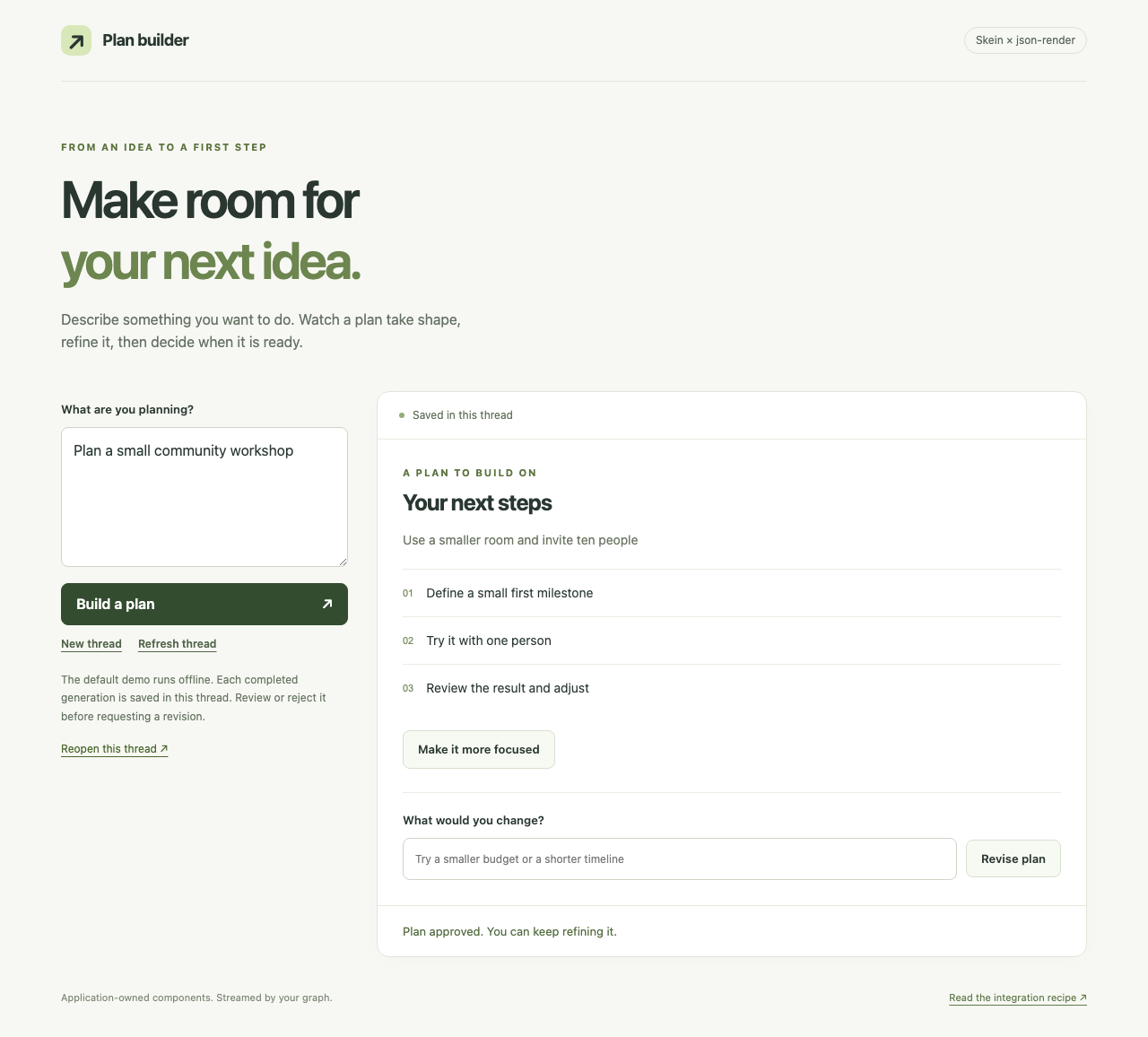
The default generator is a deterministic fixture with fixed tasks and your request as its summary. It needs no credentials or external service. To use a live model, copy the example's .env.example to .env, set JSON_RENDER_MODEL to a LangChain provider:model string, add the provider's credentials, and restart the graph server. The Google integration is installed; other providers need their LangChain integration package. Keep these settings on the backend.
Bring the pattern into your application
Start with a working React application and a Skein-hosted graph. The example uses React/React DOM 19.2.6 and Zod 4.6.7. Install the upstream integration dependencies in the appropriate frontend and graph dependency owners:
npm install @json-render/core@0.21.4 @json-render/react@0.21.4 \
  @langchain/langgraph-sdk@1.12.7 zod@4.6.7
The example's graph and browser share a catalog and small application schemas. You can copy its modules, replace the components/actions, and keep the protocol operations unchanged. The example README maps each module to its responsibility.
Define components and actions
Use defineCatalog from @json-render/core with schema from @json-render/react/schema and Zod schemas for component props and action parameters. Define React implementations with defineRegistry, then render through JSONUIProvider and Renderer from @json-render/react. The example provides Card, Text, TaskList, Button and FeedbackForm, with one revisePlan action.
Use catalog.prompt() for model instructions and catalog.jsonSchema() when your generation strategy needs a schema. The optional model path receives the previous committed specification as context but generates a complete new specification from an empty compiler. Multiple turns replace the displayed plan rather than replaying old patches onto it.
Validate completed output with catalog.validate() and the upstream validateSpec() structural validator before saving it. In json-render 0.21.4, catalog validation normalizes elements and strips their on bindings. The example preserves bindings separately through upstream ActionBindingSchema, restricted to revisePlan, and combines those with the normalized specification. It accepts no generated action chains or navigation. This validation is application policy, not a Skein setting.
Stream graph output through the compiler
The generation node streams text through LangGraph's config.writer. Its application-owned custom events identify one generation and carry contiguous sequence numbers:
| Phase | Contents |
|---|---|
start | Generation ID and sequence 0 |
chunk | Same generation ID, next sequence and a text fragment |
complete | Same generation ID and the next sequence after the final fragment |
Text fragments can end anywhere inside a JSONL patch operation. Feed them to createSpecStreamCompiler<Spec>() from @json-render/core. Use push(text).result for previews; call getResult() only at generation completion because it consumes the incomplete-line buffer. Create a fresh compiler per generation and clone snapshots before exposing them to React or retaining them as a baseline. The server uses the same compiler to validate its final result.
Create one background run with client.runs.create, requesting custom and values, then observe it with client.runs.joinStream. The example's controller binds each subscription to its thread and run, accepts only bare custom events for the current generation, and ignores custom|… subgraph events. Keep a separate controller/compiler if your application renders additional graph scopes.
Configure the SDK client with onRequest: addRunIdempotency from the example's plan-client.ts. The hook assigns an Idempotency-Key to each run-creation request, including approval resumes. SDK 1.12.7 calls the hook before its retry loop, so retries reuse that key if a successful response is lost. Each new turn or decision gets a new key. This uses Skein's existing idempotent run creation.
A Skein URL is not a direct replacement for useUIStream's generation endpoint. That hook reads SpecStream text; Skein sends Agent Protocol SSE envelopes. The SDK parses the envelopes and the application passes only their selected text fragments to the upstream compiler. See upstream streaming and Skein stream modes.
Save and restore the UI
After final validation, return the specification, generation ID and chunk count from the generation node so LangGraph checkpoints them. Keep the graph's input schema narrower than its state schema: normal requests must not be able to supply saved UI or approval state.
Reopening a thread calls threads.getState. This is the authoritative baseline and does not execute the graph. If the thread has an active run, observe that existing run. A custom complete event arrives before checkpoint completion, so it must not mark the UI as saved; reconcile state after the run becomes terminal. The example disables generated actions on unvalidated previews.
The example passes --no-persist to skein dev, so its memory server preserves threads across browser reloads while its process lives. It does not preserve them after a server restart. Configure existing durable storage for process-restart persistence. SQLite has process-local event history even when its checkpoints are durable; restoration must still use saved state.
Route actions and approvals
Button and form handlers submit validated new graph inputs through the SDK. The generated form uses json-render's state binding for its feedback field; action parameters are resolved by the upstream provider and validated again by the application and graph.
Put interrupt() in a separate node after generation has checkpointed. Render its approval controls in trusted application code. Send input: null and command.resume with the expected generation ID and decision. When the interrupt has an ID, the example addresses that ID explicitly. Resuming the review node does not rerun generation. Approval here records a boolean only; add any real-world action in your own graph after validating that decision.
Handle disconnects, cancellation and errors
- Reconnect with
lastEventIdto the same run. Reuse the SDK's transport retries and the current compiler, including its buffered partial line. Do not submit the request again. - Drop duplicate application sequence numbers before compiling. This matters for non-idempotent patches such as inserting into an array.
- Missing starts, sequence gaps or reordered chunks abandon the incomplete preview. Show the last committed specification and wait for the terminal checkpoint.
- Always reconcile terminal state, even if no gap was observed: an entirely expired history or a missing tail can produce no detectable sequence gap. The in-memory run stream does not return an explicit expired-cursor error for evicted frames.
- Unmounting or Pause updates aborts observation only. Stop run calls SDK cancellation with waiting enabled, verifies the terminal status, then reads saved state.
- Show provider, validation and transport errors without discarding the last valid specification. An uncertain run-creation response needs a thread refresh before retrying. The upstream compiler's parsing semantics apply; this example does not repair malformed lines that it ignores.
If history is lost while a generation is still running, progressive reconstruction pauses until a checkpoint is available. This recipe does not add durable patch storage or guarantee replay beyond the configured event retention.
Authentication and hosting
The sample browser sends x-user: demo-user; its Auth module requires that header, stamps thread ownership, and applies the owner filter to state, stream, run and cancellation operations. It denies unused HTTP store access. The header is a demo assertion: replace it with verified session/JWT authentication before exposing the service to other people. See authentication recipes.
Vite's development/preview proxy forwards /api to the local server. For deployment, serve the built frontend with an equivalent reverse proxy to your Skein server, or configure your own SDK base URL, credentials and CORS policy. Keep model credentials out of frontend environment variables and generated specifications.
Tested versions and limits
| Dependency | Tested version |
|---|---|
@json-render/core, @json-render/react | 0.21.4 |
@langchain/langgraph-sdk | 1.12.7 |
@langchain/langgraph, @langchain/core | 1.4.12, 1.2.18 |
langchain, optional @langchain/google-genai | 1.5.10, 2.2.0 |
| React, React DOM, Zod | 19.2.6, 19.2.6, 4.6.7 |
These versions establish this React/root-stream integration. They are not a guarantee about future json-render releases or other renderer packages. The runnable default and regression fixtures use scripted generation; live model output remains provider-dependent and must pass the same validation. This pattern renders application-owned JSON specifications; it does not use the separate graph-pushed component asset mechanism at /ui/{agent}.